Ambient AI · Built for the IEP

Special-education AI
that never asks you
to leave the page.

Teach Without Compromise.

SpedZen lives inside SpEd Forms. It reads each student's IEP in context and turns it into differentiated assignments, measurable Progress Checks, and compliant paperwork — inline, in seconds, with no student name ever leaving your device.

400K+
Special-education teachers in the U.S.
30 sec
From an IEP goal to a measurable Progress Check
0
Student names ever sent to the AI
The wedge

Not another app to open.

Every other tool asks an already-overloaded teacher to log into one more dashboard and re-enter what the IEP already says. SpedZen doesn't. It appears exactly where the work happens — a Generate button beside the goal, a progress bar beside the objective, a due-process calendar in the popup — the moment you open a student's page. No copying, no context-switching, no new habit to learn.
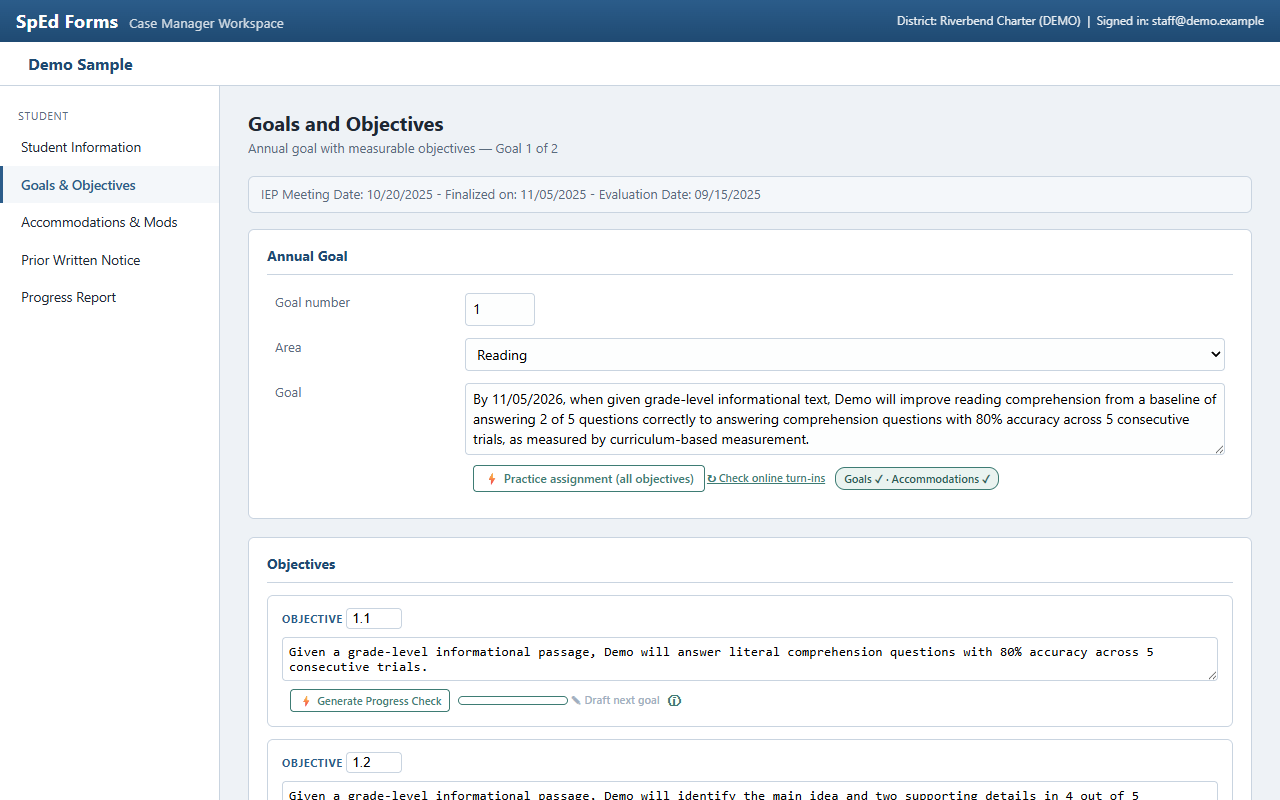
SpedZen's Generate Progress Check buttons and progress bars appearing inline on a SpEd Forms goals page
Live inside a SpEd Forms goals page — nothing to open, nothing to paste.
What it does

The whole loop, where you already work.

From the goal as written, through instruction and measurement, to the paperwork that reports it — grounded in the student's own IEP at every step.

Differentiate

Assignments from the goal

Generate fully differentiated work aligned to the IEP goal, the student's accommodations, and their reading level — as CREATE-from-scratch or MODIFY an existing assignment from Classroom or Schoology.

Measure

Progress Checks

Curriculum-based measurement probes with response levels and scoring keys. Score in two clicks; SpedZen computes the percentages and never invents a result.

Report

Data-backed progress reports

After enough scored sessions — the objective's own criterion decides how many — draft a narrative that says exactly what the recorded scores say. The data table and criterion math are computed, not generated.

Comply

Due Process, handled

A caseload calendar of annual reviews and reevaluation windows, plus next-cycle goal drafts and Prior Written Notice language — each grounded in recorded evidence, each measurable by SpedZen's own checks.

How it works

Two minutes to set up. Zero workflow change after.

1

Install from the Chrome Web Store

Pin the extension. It wakes up only on SpEd Forms, Google Classroom, and Schoology.

2

Connect your Claude account

Bring your own Anthropic key — a guided two-minute setup. You pay Anthropic directly, typically cents per generation.

3

Open a student's page

The tools are already there — beside every goal, objective, and date. Generate, deliver, score, report.

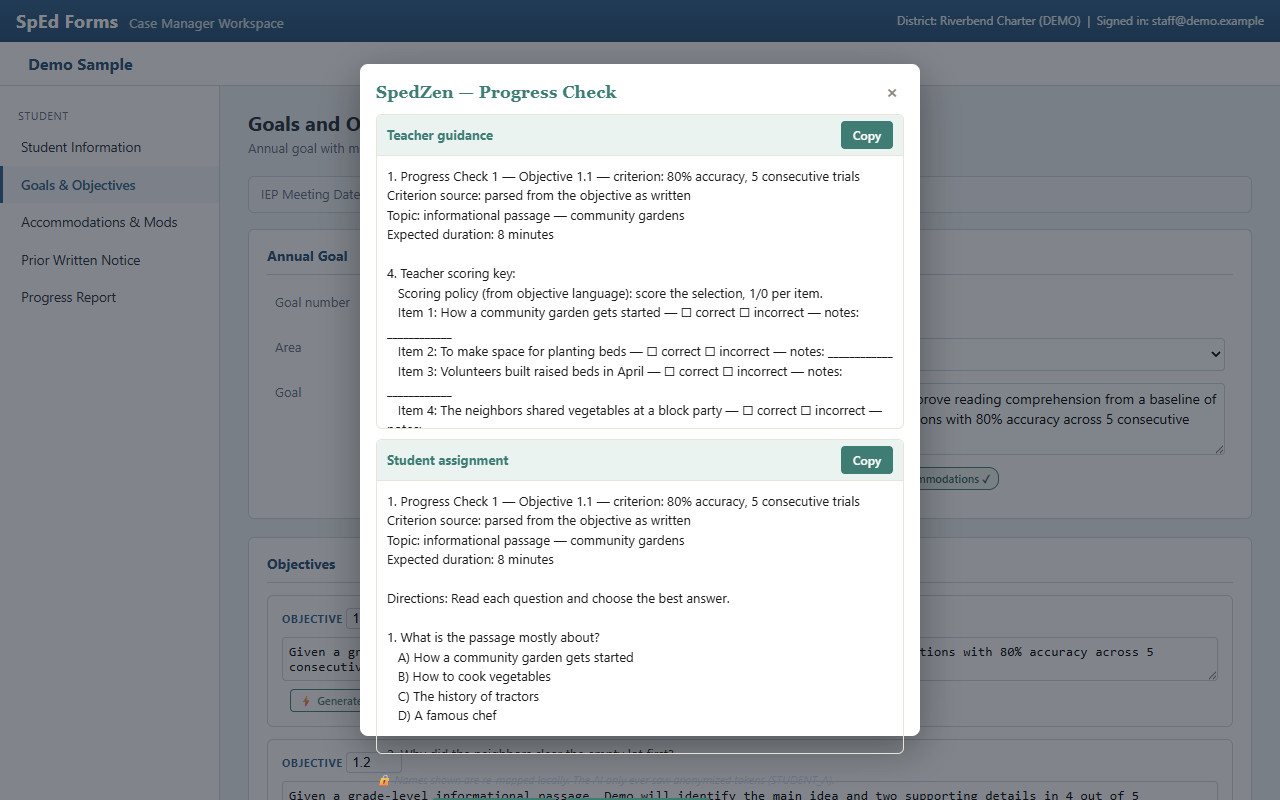
A generated SpedZen Progress Check shown inline, with teacher guidance and a student page
A Progress Check, generated in place from the objective as written.
Privacy is structural, not a promise

Student names never leave your device.

Before any request reaches the AI, SpedZen replaces every student name — including detected nicknames — with a placeholder, and a final guard inspects the outgoing bytes and blocks the request entirely if a real name slips through. Records live in your browser. SpedZen has no server and collects nothing.

Enforced in codeA byte-level outbound guard, not a policy line. Names are structurally excluded before anything is sent.
FERPA & COPPA by architectureEducation records stay on the managed device; anything transmitted is de-identified. TalliQ never receives student data.
You hold the keysYour own Anthropic key, your own optional cloud project. Uninstalling deletes everything. Nothing syncs to us.

Read the full privacy policy →

Why special education first
Build AI that holds up at the most data-rich, most legally rigorous, most underserved layer of the classroom — privacy-safe, compliance-grade, teacher-trusted — and it holds up everywhere. Special education is the wedge. Ambient, IEP-grade AI for every learner is the arc.

— TalliQ Inc., the company behind SpedZen

Get started

One teacher. One school year. The whole loop.

SpedZen Classroom
$89 / school year
Bring your own Claude key. Every tool on this page, no seat limits on your caseload.
Add SpedZen to Chrome
Pro, Campus, and District tiers — with sync and team features — coming next.